
Uses
Whiteboards
The Standard UI includes Whiteboards, a minimal drawing tool for creating and editing simple sketches and visuals. It serves as a lightweight alternative to MS Paint within your own self-hosted system.


Documentation Index
Fetch the complete documentation index at: /llms.txt
Use this file to discover all available pages before exploring further.
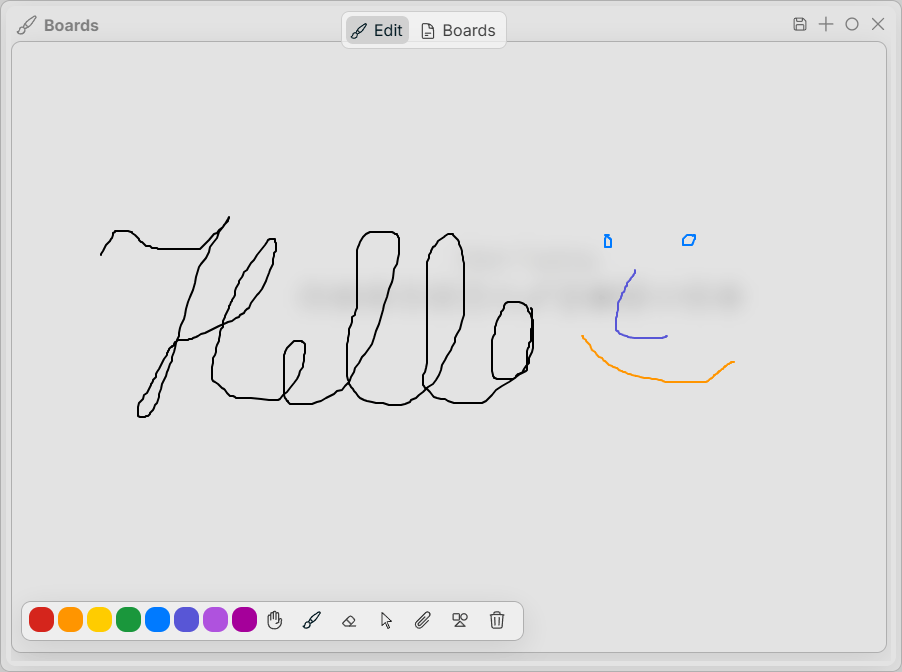
| Active | Shortcut |
|---|---|
| Save Board | Ctrl + S |
| Hand | Alt + H |
| Line | Alt + L |
| Brush | Alt + B |
| Eraser | Alt + E |
| Pointer (Selector) | Alt + P |
| Insert Attachment (image/file) | Alt + A |
| Insert Shape | Alt + S |
| Clear Board | Alt + D |
| Select Color Black | Alt + 0 |
| Select Color White | Alt + 1 |
| Select Color Red | Alt + 2 |
| Select Color Orange | Alt + 3 |
| Select Color Yellow | Alt + 4 |
| Select Color Green | Alt + 5 |
| Select Color Blue | Alt + 6 |
| Select Color Indigo | Alt + 7 |
| Select Color Violet | Alt + 8 |
| Select Color Pink | Alt + 9 |