> ## Documentation Index
> Fetch the complete documentation index at: https://docs.standardcomputers.net/llms.txt
> Use this file to discover all available pages before exploring further.
# Text Files
The Standard UI includes Text Files (Words), a simple word processing tool for creating and editing documents with basic functionality. It serves as a straightforward alternative for writing and managing text-based documents within your own self-hosted system.
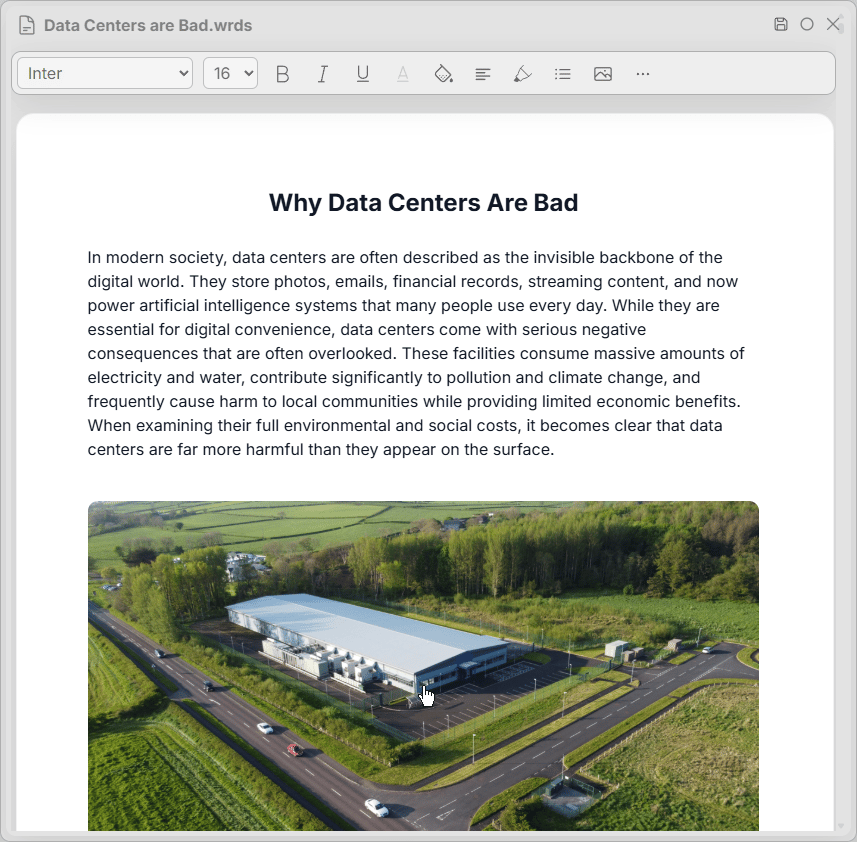 | Action | Shortcut |
| ---------------------- | ------------ |
| Save Change | Ctrl + S |
| Modify Doc | Ctrl + M |
| Find in Doc | Ctrl + G |
| Change Font Family | Alt + FF |
| Change Font Size | Alt + FS |
| Bold Text | Alt/Ctrl + B |
| Italicize Text | Alt/Ctrl + I |
| Underline Text | Alt/Ctrl + U |
| Add Link | Alt/Ctrl + K |
| Change Text Color | Alt + F |
| Change Text Background | Alt + BG |
| Align Text | Alt + A |
| Indent Text | Alt + D |
| Highlight Text | Alt + H |
| Insert List | Alt + L |
| Insert Shape | Alt + SH |
| Insert Image | Alt + IM |
| Doc View Options | Alt + O |
| Action | Shortcut |
| ---------------------- | ------------ |
| Save Change | Ctrl + S |
| Modify Doc | Ctrl + M |
| Find in Doc | Ctrl + G |
| Change Font Family | Alt + FF |
| Change Font Size | Alt + FS |
| Bold Text | Alt/Ctrl + B |
| Italicize Text | Alt/Ctrl + I |
| Underline Text | Alt/Ctrl + U |
| Add Link | Alt/Ctrl + K |
| Change Text Color | Alt + F |
| Change Text Background | Alt + BG |
| Align Text | Alt + A |
| Indent Text | Alt + D |
| Highlight Text | Alt + H |
| Insert List | Alt + L |
| Insert Shape | Alt + SH |
| Insert Image | Alt + IM |
| Doc View Options | Alt + O |